
Argo CD
Argo CD is an open-source GitOps continuous delivery tool for Kubernetes that syncs cluster state to Git-defined manifests.
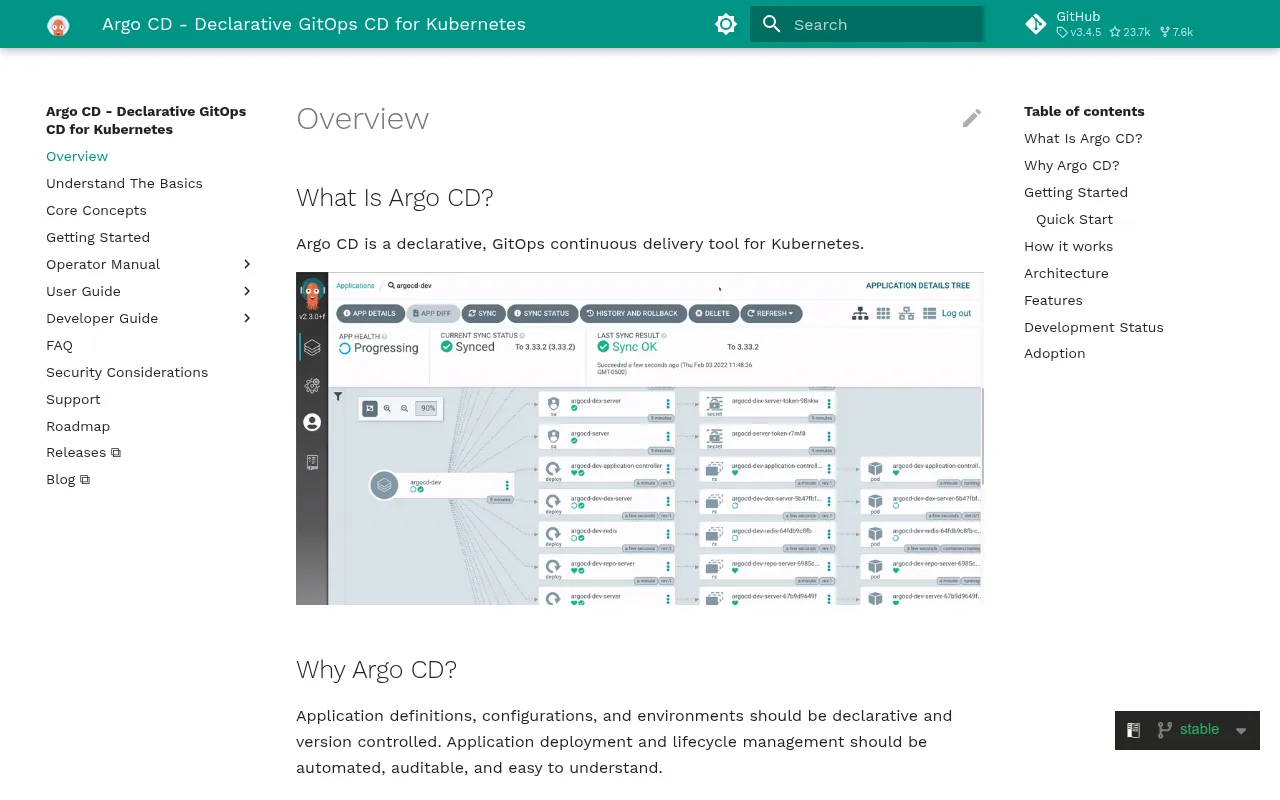
Argo CD is a declarative, GitOps-based continuous delivery tool built specifically for Kubernetes. It watches a Git repository containing your application manifests, Helm charts, or Kustomize configs, and reconciles the live cluster state to match what's defined in Git. It's aimed at platform teams, SREs, and developers who want deployments to be version-controlled, auditable, and repeatable instead of driven by ad hoc kubectl commands or imperative CI scripts.
The project is part of the Argo suite under the CNCF umbrella and is written in Go. It ships as a Kubernetes controller plus a web UI, CLI, and API server, so you can manage deployments through whichever interface fits your workflow.
Key features
- Declarative GitOps model: application definitions, target environments, and configurations live in Git, and Argo CD continuously reconciles the cluster to match.
- Automated sync and drift detection: it detects when live cluster state diverges from Git and can auto-sync or flag the difference for manual review.
- Web UI and CLI: a visual dashboard (shown in the project's demo GIF) plus a full-featured CLI for managing applications, viewing diffs, and triggering syncs.
- Multi-tool manifest support: works with plain Kubernetes YAML, Helm charts, Kustomize, and other config management tools.
- Auditability: every change traces back to a Git commit, giving you a history of who changed what and when.
- Helm chart distribution: officially published and listed on Artifact Hub for straightforward cluster installation.
- SLSA and security posture: the project publishes SLSA level 3 provenance and tracks an OpenSSF Scorecard, relevant if you care about supply-chain security for your CD tooling.
- Live demo: a hosted instance is available for evaluating the UI and workflow before installing anything.
Ideal use cases
Argo CD fits teams already running Kubernetes who want to move from manual or scripted deployments to a Git-driven model. Typical scenarios:
- You manage multiple clusters or environments (dev, staging, prod) and want a single source of truth for what's deployed where.
- Your team wants deployment changes to go through pull requests and code review, with an audit trail tied to Git history.
- You need drift detection: alerts or auto-remediation when someone manually changes cluster state outside of Git.
- You're combining Argo CD with related tools like Argo Rollouts (progressive delivery), Argo Workflows, or Argo Events for a fuller CI/CD and automation pipeline.
- You want preview environments generated from pull requests, using patterns documented in the community write-ups linked from the project.
It's not a good fit if you're not running Kubernetes at all, or if your deployment model is simple enough that a basic CI pipeline (build, test, kubectl apply) already covers your needs without the overhead of running an additional controller and UI. Teams looking for a full CI system (build and test orchestration) will still need a separate CI tool, since Argo CD handles delivery, not building or testing.
Installation
Argo CD runs as a set of controllers and services inside your Kubernetes cluster. The project distributes a Helm chart (listed on Artifact Hub) and Kubernetes manifests referenced from the official docs site.
A typical install creates a dedicated namespace and applies the install manifest:
kubectl create namespace argocd
kubectl apply -n argocd -f https://raw.githubusercontent.com/argoproj/argo-cd/stable/manifests/install.yaml
Or install via the Helm chart published to Artifact Hub:
helm repo add argo https://argoproj.github.io/argo-helm
helm repo update
helm install argocd argo/argo-cd -n argocd --create-namespace
After installation, access the UI by port-forwarding the API server service, then log in with the CLI:
kubectl port-forward svc/argocd-server -n argocd 8080:443
argocd login localhost:8080
For full configuration options, application manifests, RBAC setup, and SSO integration, consult the complete documentation at argo-cd.readthedocs.io, which covers scenarios beyond the scope of the base README.
Frequently asked questions






Similar to Argo CD


