
Everyone Can Use English
Open-source AI English learning system: web app, Chrome extension for YouTube/Netflix, and the Everyone Can Use English training method.
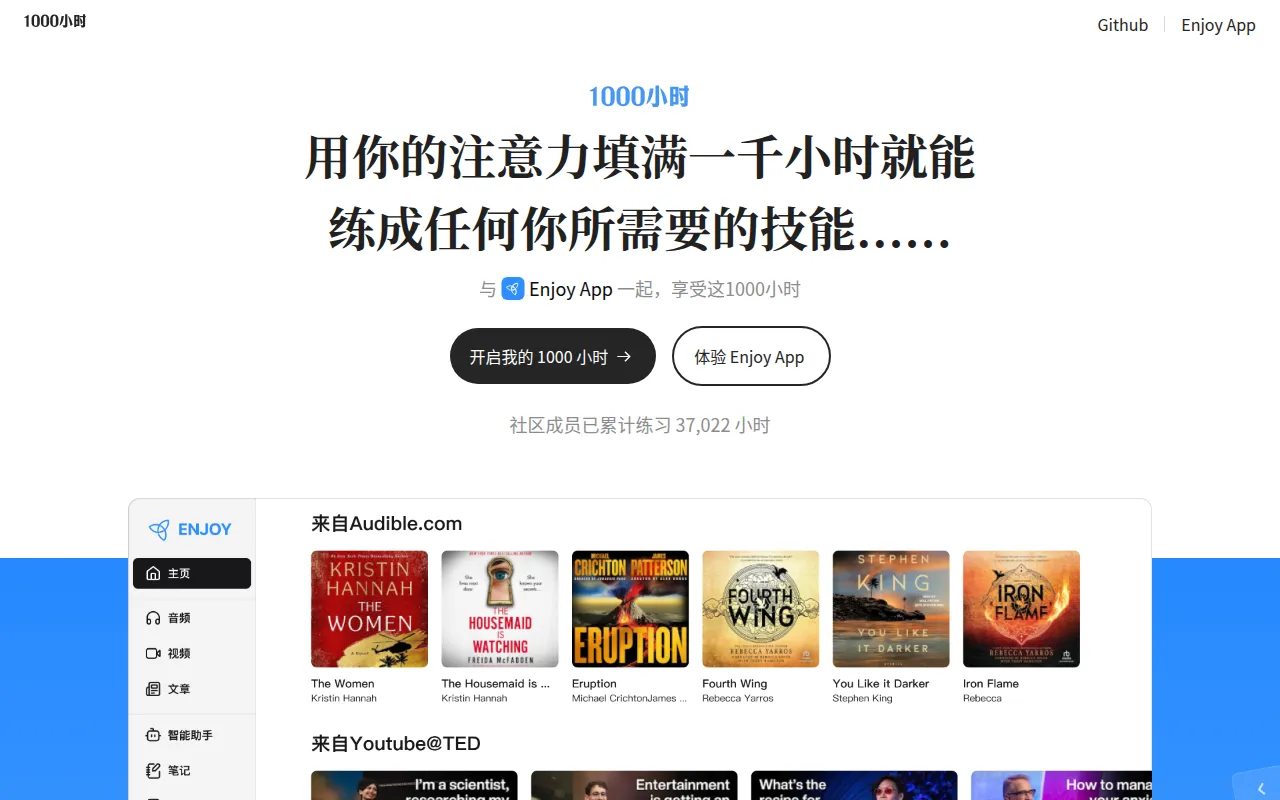
Enjoy is an AI-driven English learning project built around the idea that AI can act as a full-time language tutor. It combines a web application, a browser extension for watching YouTube and Netflix with language support, and a self-study curriculum (the "1000 hours" and "Everyone Can Use English" materials). It's aimed at English learners who want structured, AI-assisted practice, and at Chinese-speaking developers or teachers interested in the underlying training methodology and open-source tooling behind it.
The project has two layers: the software (a TypeScript-based web app and browser extension) and the content (a training method built over years, including a 2010 book and a 2024 "1000 hours" program). Together they form a self-training system for listening, speaking, reading aloud, vocabulary, and grammar work, with AI filling the role of tutor and practice partner.
Key features
- Web app: A hosted version of Enjoy is available directly at enjoy.bot, no local install needed for end users.
- Browser extension: A Chrome extension (Enjoy Echo) adds language-learning support on top of YouTube and Netflix video playback.
- Structured training content: The "1000 hours" program covers training tasks, sound/phonetics shaping, cognitive background ("in the brain"), and self-training routines.
- Companion book: "人人都能用英语" (Everyone Can Use English), a full book with chapters on starting points, speaking, phonetics, reading aloud, dictionary use, grammar, and intensive reading, included in the repo as markdown.
- Flashcards, courses, and video/ebook views: Screenshots in the repo show video-based lessons, ebook reading, flashcard review, and course structures inside the app.
- Desktop version in progress: A desktop build is planned as a wrapper and enhancement of the web app.
- CI/CD workflows: The repo ships GitHub Actions for deploying the 1000h website, testing the Enjoy app, and releasing app builds.
Ideal use cases
This project fits learners who want an AI-backed, video- and audio-centric approach to English practice, especially if they already watch content on YouTube or Netflix and want built-in language support layered on top. It also fits people interested in a full self-study curriculum rather than isolated vocabulary drills, since the book and 1000-hours materials lay out a long-form training path.
It's also relevant to developers who want to study or extend an AI-assisted language learning app written in TypeScript, or who want to reuse the training content (book chapters, training task descriptions) for their own projects, subject to the GPL-3.0 license.
It's not a good fit if you're looking for a quick vocabulary flashcard app with no time commitment. The underlying method assumes sustained practice (the "1000 hours" framing is literal). It's also primarily documented in Chinese, so non-Chinese-reading developers will need translation help to follow the training materials, even though the app and extension interfaces are usable directly.
Installation
For most users, no local installation is required:
- Use the hosted web app directly at enjoy.bot.
- Install the browser extension from the Chrome Web Store to get YouTube and Netflix support.
The README does not include explicit local build/setup commands for the app itself. If you want to run or contribute to the code, clone the repository and inspect the enjoy directory, which contains the app source and its CI workflows:
git clone https://github.com/ZuodaoTech/everyone-can-use-english.git
cd everyone-can-use-english/enjoy
From there, follow standard TypeScript/Node.js project conventions (checking package.json scripts, then running npm install or yarn install followed by the relevant build/test/dev script) since the repo's GitHub Actions reference test and release workflows for the app. A desktop version is planned as a wrapper around the web app but was not yet released at the time of writing this README.
For questions about using the app itself, the maintainers point to a dedicated FAQ page rather than the repo's issue tracker: 1000h.org/enjoy-app/faq.html.
Frequently asked questions






Similar to Everyone Can Use English


